Postgres Timestamp with Timestamptz vs Timestamp
Understanding the difference between timestamp and timestamptz in PostgreSQL is one of the most critical decisions you’ll make when designing a database schema. Choose wrong, and you’ll spend months debugging bizarre time-related bugs that only surface when your users span multiple time zones. This guide breaks down everything you need to know—storage behavior, conversion rules, real-world pitfalls, and exactly when to use each type.
What Is Timestamp (Without Time Zone)?
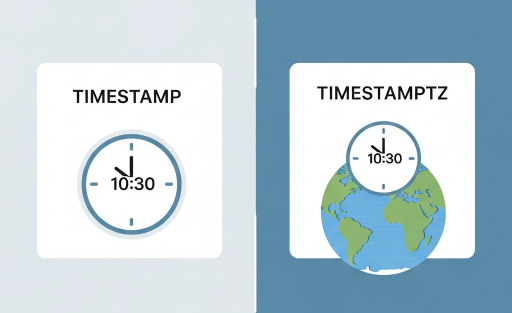
The timestamp data type, formally known as timestamp without time zone, stores a date and time value exactly as you provide it. It has no awareness of time zones whatsoever. When you insert 2025-07-15 14:30:00 into a timestamp column, PostgreSQL stores precisely that value—no conversion, no adjustment, no context about where in the world that time applies.
Think of it like writing a time on a sticky note. The note says “2:30 PM” but gives no indication whether that’s 2:30 PM in Tokyo, London, or New York. The database faithfully records what you gave it and returns it verbatim, regardless of the session’s time zone setting.
The SQL declaration looks like this:
CREATE TABLE events ( event_id SERIAL PRIMARY KEY, event_name TEXT, event_time TIMESTAMP);
When you query that column later, you’ll get back the raw value you inserted, no matter what your current timezone session variable is set to.
What Is Timestamptz (With Time Zone)?
The timestamptz data type, formally known as timestamp with time zone, stores a date and time value that is always internally normalized to UTC. Despite the name, PostgreSQL does not store the original time zone alongside the value. Instead, it converts the incoming value to UTC for storage and then converts it back to the session’s local time zone on retrieval.
This is a crucial detail that trips up many developers. The “with time zone” label means the type is time-zone-aware, not that it literally persists a time zone string in the row. When you insert 2025-07-15 14:30:00 America/New_York, PostgreSQL converts that to 2025-07-15 18:30:00 UTC and stores the UTC representation. When another user in Asia/Tokyo queries the same row, they’ll see 2025-07-16 03:30:00+09 — the same absolute moment expressed in their local time.
CREATE TABLE meetings ( meeting_id SERIAL PRIMARY KEY, title TEXT, scheduled_at TIMESTAMPTZ);
This behavior makes timestamptz the correct choice for representing a specific instant in time — a moment that all observers, regardless of location, agree happened at the same point on the universal timeline.
How PostgreSQL Stores Each Type Internally
Both timestamp and timestamptz occupy exactly 8 bytes of storage in PostgreSQL. There is zero difference in disk footprint. Both types use a 64-bit integer internally (since PostgreSQL 8.4 and later default builds), representing microseconds relative to the PostgreSQL epoch of 2000-01-01 00:00:00.
The key difference is not in how the bits are stored, but in what those bits mean and how PostgreSQL processes them on input and output.
For timestamp, the stored integer represents a “wall clock” reading with no universal anchor. For timestamptz, the stored integer represents microseconds from 2000-01-01 00:00:00 UTC — an absolute point on the timeline.
The Critical Difference: Input and Output Behavior
This is where the real divergence lies, and it is the single most important concept to internalize.
On input with timestamptz: If you provide a time zone offset or identifier (like +05:30 or America/Chicago), PostgreSQL uses that to convert the value to UTC before storing it. If you provide no offset, PostgreSQL assumes the value is in the session’s current timezone setting and converts accordingly. Either way, what gets stored is UTC.
On input with timestamp: PostgreSQL strips and ignores any time zone information you provide. If you insert 2025-07-15 14:30:00+05:30, the +05:30 is silently discarded, and 2025-07-15 14:30:00 is stored as-is.
In output with timestamptz: PostgreSQL converts the stored UTC value to the session’s current time zone before displaying it.
On output with a timestamp: PostgreSQL returns the stored value as-is, with no conversion, regardless of the session time zone.
Here is a practical demonstration:
SET timezone = 'America/New_York';-- Insert into both typesINSERT INTO test_ts (ts_col) VALUES ('2025-07-15 14:30:00');INSERT INTO test_tstz (tstz_col) VALUES ('2025-07-15 14:30:00');-- Now change the session time zoneSET timezone = 'Asia/Kolkata';SELECT ts_col FROM test_ts;-- Returns: 2025-07-15 14:30:00 (unchanged)SELECT tstz_col FROM test_tstz;-- Returns: 2025-07-16 00:00:00+05:30 (converted from UTC to IST)
The timestamp column returns exactly what was stored. The timestamptz column shows the same absolute moment, re-expressed for the Kolkata time zone.
Why the Name “With Time Zone” Is Misleading
One of the most persistent misconceptions in the PostgreSQL community is that timestamptz literally stores a time zone. It does not. The PostgreSQL documentation is explicit about this: the stored representation is always UTC. The “with time zone” qualifier describes the type’s behavior — it is aware of, and interacts with, time zones during input and output — not its storage format.
If your application actually needs to remember which specific time zone the user was in when they created a record (for example, for display purposes or business rules tied to the originating zone), you must store that time zone in a separate column. A common and effective pattern is:
CREATE TABLE user_actions ( action_id SERIAL PRIMARY KEY, performed_at TIMESTAMPTZ, user_timezone TEXT);
This gives you the best of both worlds: an absolute moment in time via timestamptz, and the user’s original zone context for any display or reporting logic that needs it.
Timestamp vs Timestamptz: A Direct Comparison
To summarize the core differences in plain terms:
Storage size is identical for both types at 8 bytes. Resolution is also identical, with both supporting microsecond precision. The range for both spans from 4713 BC to 294276 AD.
Where they differ is in semantics. timestamp represents a “wall clock” reading — a local date and time with no universal meaning. timestamptz represents an absolute instant — a single point on the universal timeline that all observers agree on.
In terms of time zone conversion, timestamp performs none, while timestamptz converts on both input (to UTC) and output (from UTC to the session zone).
Regarding the AT TIME ZONE operator, applying it to a timestamp value returns a timestamptz, and applying it to a timestamptz value returns a timestamp. This seemingly paradoxical behavior makes perfect sense once you understand the semantics: you’re adding zone awareness to an unaware value, or extracting a local representation from an aware value.
The AT TIME ZONE Operator Explained
The AT TIME ZONE construct is where many developers get confused, because it behaves differently depending on which type you apply it to.
Applied to timestamptz: It converts the absolute instant to a local “wall clock” reading in the specified zone and returns a timestamp (without time zone). The result is what a clock on the wall in that zone would show at that instant.
SELECT TIMESTAMPTZ '2025-07-15 18:30:00 UTC' AT TIME ZONE 'America/New_York';-- Returns: 2025-07-15 14:30:00 (a timestamp without time zone)
Applied to timestamp: It interprets the “wall clock” reading as being in the specified zone and returns a timestamptz (the corresponding absolute instant in UTC).
SELECT TIMESTAMP '2025-07-15 14:30:00' AT TIME ZONE 'America/New_York';-- Returns: 2025-07-15 18:30:00+00 (a timestamptz, meaning UTC)
This operator is essential for converting between the two types correctly and is far safer than using ::timestamp or ::timestamptz casts, which implicitly rely on the session time zone.
When to Use Timestamp (Without Time Zone)
There are legitimate use cases for timestamp, though they are narrower than many developers assume.
Recurring events that follow local time. If you’re modeling something like “this meeting happens every Tuesday at 9:00 AM local time,” the concept is inherently zone-independent. The 9:00 AM is a wall-clock time that applies in whatever zone the participant is in. Storing this as a timestamp makes sense because it represents a local time that is not anchored to a specific UTC moment.
Historical dates where the zone is irrelevant or unknowable. If you’re recording the date of a historical event where precise UTC alignment doesn’t matter (like “the document was signed on July 4, 1776”), a timestamp avoids injecting false precision about time zones.
Systems that operate entirely in a single, fixed time zone with no possibility of change. This is rarer than people think. Even if all your users are in one time zone today, business requirements change. But if you are genuinely certain, timestamp is simpler to reason about.
When to Use Timestamptz (With Time Zone)
For the vast majority of applications, timestamptz is the correct default. The PostgreSQL documentation, as well as consensus among experienced PostgreSQL developers, recommends timestamptz as the default unless you have a specific reason to use timestamp.
You should use timestamptz when recording when something happened (event logs, audit trails, created_at/updated_at columns), when scheduling something for a specific moment in time, when your users span multiple time zones, when you need correct ordering of events across zones, and when performing time arithmetic that must account for daylight saving transitions.
Consider this scenario: A user in New York schedules a video call for 2025-03-09 02:30:00. This time does not exist in America/New_York because clocks spring forward from 2:00 AM to 3:00 AM on that date. If you store this as a timestamp, the database will happily accept the impossible time. If you store it as timestamptz and the input is interpreted in the New York zone, PostgreSQL will adjust the value, making the bug visible at write time rather than at read time.
Common Pitfalls and How to Avoid Them
Pitfall 1: Assuming timestamptz stores the time zone. As discussed above, it stores UTC. If you need the original zone, store it separately.
Pitfall 2: Mixing the two types in comparisons. When you compare a timestamp to a timestamptz, PostgreSQL implicitly casts the timestamp to timestamptz using the session’s time zone. This means the same query can return different results depending on the session setting, which is a recipe for subtle bugs. Always be explicit about conversions.
Pitfall 3: Using timestamp and relying on the application layer to “always send UTC.” This is a common pattern — the team agrees that all timestamp values are “really UTC” by convention. It works until someone forgets, until a third-party integration sends local time, or until a new developer joins who doesn’t know the convention. Using timestamptz enforces correct behavior at the database level.
Pitfall 4: Ignoring the session timezone setting. Many ORMs and database drivers set the session time zone when they connect. If your application server is in US/Eastern and your driver sets the session accordingly, every timestamptz insertion without an explicit offset will be interpreted as Eastern time. This is often correct, but you need to be aware of it. A defensive practice is to set the session time zone to UTC in your connection configuration so that all raw values are treated as UTC by default.
Pitfall 5: Incorrect use of NOW() and CURRENT_TIMESTAMP. Both of these functions return a timestamptz. If you insert the result into a timestamp column, PostgreSQL casts it by stripping the zone information relative to the session time zone. This means the stored value depends on the session’s timezone setting at the time of insertion, which can vary.
How ORMs and Drivers Handle Each Type
Different programming ecosystems handle these types with varying degrees of correctness.
In Python with psycopg2 or psycopg3, a timestamptz column maps to a timezone-aware datetime object (with tzinfo set), while a timestamp column maps to a naive datetime object (with tzinfo set to None). This distinction is important because mixing aware and naive datetimes in Python raises TypeError exceptions.
In JavaScript/Node.js with pg (node-postgres), both types are parsed into JavaScript Date objects by default. Since JavaScript Date is always UTC-based internally, the nuance between the two types can be lost if you’re not careful. Libraries like pg-types allow custom type parsing to preserve the distinction.
In Java with JDBC, timestamptz maps naturally to java.time.OffsetDateTime or java.time.Instant, while timestamp maps to java.time.LocalDateTime. Using the wrong Java type can lead to silent, incorrect time zone conversions.
The general advice across all ecosystems is: use timestamptz in the database and work with UTC or zone-aware types in your application code.
Performance Considerations
There is no meaningful performance difference between timestamp and timestamptz for storage, indexing, or comparison operations. Both are 8-byte fixed-width types, and PostgreSQL processes them with the same internal functions. The only marginal overhead for timestamptz is the UTC-to-local conversion on output, which is negligible — it’s a simple arithmetic offset lookup that completes in nanoseconds.
B-tree indexes work identically on both types. Range queries, sorting, and partitioning perform the same. You should never choose one type over the other based on performance; the decision should be driven entirely by correctness and semantics.
Timestamptz and Daylight Saving Time (DST)
One of the strongest arguments for timestamptz is its correct handling of daylight saving time transitions. Because timestamptz stores values in UTC, it is immune to the ambiguity that DST creates.
Consider the fall-back transition in America/New_York on 2025-11-02, when clocks move from 2:00 AM back to 1:00 AM. The wall-clock time 01:30 AM occurs twice — once in EDT (UTC-4) and once in EST (UTC-5). A timestamp column has no way to distinguish between these two occurrences. A timestamptz column stores two distinct UTC values (05:30 UTC and 06:30 UTC), correctly representing two different instants in time.
For applications that deal with scheduling, billing, logging, or any time-sensitive operations, this distinction is not academic — it has real financial and operational consequences.
Migrating from Timestamp to Timestamptz
If you’re working with an existing schema that uses timestamp and want to migrate to timestamptz, you need to be deliberate about how existing values are interpreted. A simple ALTER TABLE … ALTER COLUMN … TYPE TIMESTAMPTZ will convert existing values using the session’s current time zone, which means you must set the session time zone to whatever zone your existing data represents before running the migration.
-- If existing data is known to be in UTC:SET timezone = 'UTC';ALTER TABLE events ALTER COLUMN event_time TYPE TIMESTAMPTZ;-- If existing data is known to be in US/Eastern:SET timezone = 'America/New_York';ALTER TABLE events ALTER COLUMN event_time TYPE TIMESTAMPTZ;
This operation rewrites the entire table (since the physical representation changes for each row), so for large tables, plan for downtime or use a concurrent migration strategy such as creating a new column, backfilling, and then swapping.
Quick Reference: Function Behavior with Each Type
The behavior of common date-time functions varies by type.
NOW() and CURRENT_TIMESTAMP both return timestamptz. LOCALTIMESTAMP returns timestamp. The EXTRACT function works on both types but extracts components based on the stored representation — UTC for timestamptz (after converting to the session zone) and the raw value for timestamp. The date_trunc function similarly respects time zone awareness: truncating a timestamptz to ‘day’ aligns to midnight in the session’s time zone, while truncating a timestamp aligns to midnight of the stored value.
Frequently Asked Questions
Does timestamptz take more storage than timestamp?
No. Both types use exactly 8 bytes. There is no storage penalty for using timestamptz.
Can I store a specific time zone with timestamptz?
No. PostgreSQL converts to UTC and discards the original zone. Store the time zone in a separate TEXT column if needed.
Which should I use as a default?
Use timestamptz unless you have a specific, well-understood reason to use timestamp. This is the recommendation of the PostgreSQL documentation and the broader community.
What happens if I insert a value with no time zone into a timestamptz column?
PostgreSQL assumes the value is in the session’s current timezone and converts accordingly.
Are comparisons between timestamp and timestamptz safe?
They are allowed but dangerous. PostgreSQL will implicitly cast the timestamp to timestamptz using the session time zone. This makes the result session-dependent, which can cause subtle bugs. Always cast explicitly.
How does timestamptz work with partitioning?
Partition boundaries for timestamptz columns are evaluated in the session’s time zone. For predictable behavior, set the session to UTC when creating partitions, or specify offsets explicitly in the boundary values.
Summary:
The choice between timestamp and timestamptz is not a matter of preference — it’s a matter of semantics. If you’re recording an absolute moment in time (which is the case for most application data), timestamptz is the correct choice. It enforces time zone awareness at the database level, handles daylight saving transitions correctly, and produces consistent behavior regardless of where your application servers or users are located.
Reserve timestamp for the narrow cases where you genuinely need a “floating” local time with no connection to UTC — recurring calendar events, abstract schedules, or scenarios where the time zone is deliberately unspecified.
When in doubt, choose timestamptz. The cost is zero (identical storage, identical performance), and the benefit is a dramatically lower risk of time zone bugs that are notoriously difficult to diagnose after the fact.