The Complete Guide to Managing Timezones in PHP, JavaScript, and Python
In modern software development, working with dates and times across different geographical locations is a common but infamously complex requirement. If not handled appropriately, the minute details of time zones, Daylight Saving Time (DST), and the difference between a particular moment in time and a “wall clock” reading can result in perplexing bugs, inaccurate data, and a bad user experience. In this guide, you’ll find clear, actionable best practices for handling timezones in PHP, JavaScript, and Python. The main principles you’ll see throughout are:
- Always store times in UTC on the backend, and do all server-side logic in UTC.
- Only convert times to a user’s local timezone right before display or user interaction.
- Use IANA timezone identifiers (like America/New_York) for accuracy and clarity, avoiding ambiguous abbreviations like EST or PDT.
- Prefer modern, built-in, or well-supported libraries over legacy approaches when possible.
This info provides a comprehensive overview of the design philosophies and practical methods for managing time zones effectively in three of the most popular web development languages: Python, JavaScript, and PHP.
1. Understanding Timezone Fundamentals
Before diving into language-specific implementations, it’s essential to grasp a few key concepts:
- UTC (Coordinated Universal Time):The primary time standard by which the world regulates clocks and time. It is a successor to Greenwich Mean Time (GMT) and is the recommended standard for storing all time data. For most practical purposes in computing, UTC and GMT are equivalent.
- Timezone: A region of the globe that observes a uniform standard time for legal, commercial, and social purposes. Time zones are often expressed as offsets from UTC (e.g., UTC-5 or UTC+8).
- IANA Time Zone Database: A standardized database of timezone information, also known as the tz, tzdata, or Olson database. It uses identifiers like America/New_York or Europe/London. These are preferable to abbreviations like EST or PST, which can be ambiguous.
- DST (Daylight Saving Time): The practice of advancing clocks during warmer months so that darkness falls at a later clock time. This means a single timezone can have different UTC offsets at different times of the year, adding complexity that IANA identifiers handle automatically.
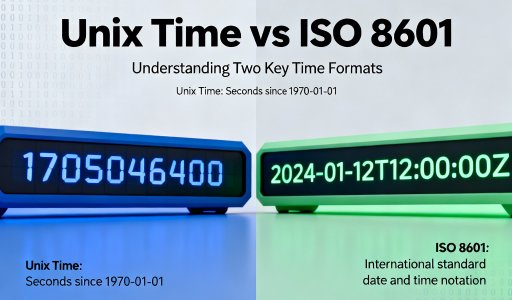
- Unix Timestamp: The number of seconds (or milliseconds) that have elapsed since the Unix epoch, which is 00:00:00 UTC on 1 January 1970. By definition, a Unix timestamp is always in UTC.
- “Wall Clock” Time: A time as read from a clock without any timezone information, like “9:00 AM”. This concept is important when scheduling future events, as the rules for a timezone (like DST dates) might change.
A universal best practice is to store all dates and times in UTC in your backend systems and databases. All server-side logic should be performed in UTC. Conversion to a user’s local timezone should only happen at the very last moment, typically in the user interface.
2. Handling Timezones in Python
Design Philosophy: Explicit is Better than Implicit
Python’s datetime module embodies the language’s philosophy of explicitness by distinguishing between “naive” and “aware” objects.
- Naive datetime: Does not contain any timezone information. It represents a time without context (e.g., “8:00 AM”), but we don’t know where it’s 8:00 AM.
- Aware datetime: Contains timezone information via a tzinfo attribute, representing a specific, unambiguous moment in time.
This design forces the developer to be deliberate about timezone handling, reducing ambiguity.
For example, a common bug occurs when a timestamp retrieved from the database is treated as a naive datetime, while it actually represents a specific instant in UTC. If you take a naive datetime (with no timezone) and later compare it or convert it without setting an explicit timezone, Python will not warn you, but the calculation could yield incorrect results—especially when crossing DST changes or when displaying to users in different time zones. Imagine scheduling an event for 8:00 AM in New York and storing it without timezone info; on retrieval, if you interpret this as local time in another region, the time will be wrong. Such mix-ups can easily lead to missed meetings or incorrect data processing. Explicitness with aware datetimes helps avoid these real-world pitfalls by making the timezone context clear.
Modern Approach: The zoneinfo Module (Python 3.9+)
Since Python 3.9, the zoneinfo module has been the recommended way to handle time zones, using the system’s IANA database.
1. Create a timezone-aware datetime object:
from datetime import datetimefrom zoneinfo import ZoneInfo# Create a timezone-aware object for 'November 5, 2024, at 2:00 PM' in 'Europe/Paris'paris_tz = ZoneInfo("Europe/Paris")dt_paris = datetime(2024, 11, 5, 14, 0, 0, tzinfo=paris_tz)print(dt_paris)# Output: 2024-11-05 14:00:00+01:00
2. Interpret a “wall clock” string:
from datetime import datetimefrom zoneinfo import ZoneInfo# Interpret '2023-11-20 10:00:00' as being in 'America/New_York'naive_dt = datetime.fromisoformat('2023-11-20 10:00:00')ny_tz = ZoneInfo("America/New_York")dt_ny = naive_dt.replace(tzinfo=ny_tz)print(dt_ny)# Output: 2023-11-20 10:00:00-05:00
3. Convert between time zones:
Use the .astimezone() method on an aware datetime object.
# Continuing from the previous example...tokyo_tz = ZoneInfo("Asia/Tokyo")dt_tokyo = dt_ny.astimezone(tokyo_tz)print(f"New York: {dt_ny}")print(f"Tokyo: {dt_tokyo}")# Output:# New York: 2023-11-20 10:00:00-05:00# Tokyo: 2023-11-21 00:00:00+09:00
Working with Unix Timestamps
- From Unix Timestamp to datetime: Use datetime.fromtimestamp() and pass the ZoneInfo object to the tz argument. For milliseconds, divide by 1000 first.
timestamp_seconds = 1678886400 # 2023-03-15 12:00:00 UTCdt_object = datetime.fromtimestamp(timestamp_seconds, tz=ZoneInfo("America/New_York"))print(dt_object) # Output: 2023-03-15 08:00:00-04:00
- From datetime to Unix Timestamp: Call the .timestamp() method on an aware object. Multiply by 1000 for milliseconds.
aware_dt = datetime(2023, 10, 26, 10, 30, 0, tzinfo=ZoneInfo("Europe/London"))unix_timestamp = aware_dt.timestamp()print(unix_timestamp) # Output: 1698297000.0
Legacy Approach: The pytz Library and Its Pitfalls
Before Python 3.9, the third-party pytz library was standard. For all new projects, zoneinfo is strongly preferred.
3. Handling Timezones in JavaScript
Design Philosophy: UTC Core with a Confusing Local-Time Facade
JavaScript’s native Date object stores time as milliseconds since the UTC epoch, which is timezone-agnostic. However, most methods operate in the user’s local time zone by default, which can cause confusion. The native Date cannot be associated with a specific IANA timezone reliably, leading to library adoption.
Modern Approach: Intl.DateTimeFormat for Display
For displaying dates, use the Intl API.
const eventDate = new Date("2023-11-10T02:00:00.000Z"); // UTC from serverconst newYorkFormatter = new Intl.DateTimeFormat('en-US', { timeZone: 'America/New_York', year: 'numeric', month: 'long', day: 'numeric', hour: 'numeric', minute: 'numeric', timeZoneName: 'short'});console.log(newYorkFormatter.format(eventDate));// Output: "November 9, 2023, 9:00 PM EST"
Detect the user’s IANA timezone:
const userTimeZone = Intl.DateTimeFormat().resolvedOptions().timeZone;console.log(userTimeZone); // e.g., "America/Los_Angeles"
Robust Approach: Using Libraries (Luxon)
Luxon offers an immutable, explicit API.
1. Create a timezone-aware DateTime object:
import { DateTime } from 'luxon';// 'November 5, 2024, at 2:00 PM' in 'Europe/Paris'const dtParis = DateTime.fromObject( { year: 2024, month: 11, day: 5, hour: 14 }, { zone: 'Europe/Paris' });console.log(dtParis.toString());// Output: 2024-11-05T14:00:00.000+01:00
2. Interpret a “wall clock” string:
const dtNy = DateTime.fromFormat( '2023-11-20 10:00:00', 'yyyy-MM-dd HH:mm:ss', { zone: 'America/New_York' });console.log(dtNy.toString());// Output: 2023-11-20T10:00:00.000-05:00
3. Convert between timezones:
const dtTokyo = dtNy.setZone('Asia/Tokyo');console.log(`New York: ${dtNy.toString()}`);console.log(`Tokyo: ${dtTokyo.toString()}`);// Output:// New York: 2023-11-20T10:00:00.000-05:00// Tokyo: 2023-11-21T00:00:00.000+09:00
Another option: date-fns-tz.
Note on getTimezoneOffset(): Returns the local timezone offset in minutes from UTC (positive if local is behind UTC, e.g., 480 for UTC-8). It varies with DST and is implementation-defined for historical data.
4. Handling Timezones in PHP
Design Philosophy: Object-Oriented and Inherently Aware
PHP’s DateTime, DateTimeImmutable, and DateTimeZone classes link time directly to zones.
1. Set the default timezone:
date_default_timezone_set('UTC');
2. Create a timezone-aware DateTime object:
<?php$parisTz = new DateTimeZone('Europe/Paris');$dtParis = new DateTime('2024-11-05 14:00:00', $parisTz);echo $dtParis->format(DateTime::ATOM);// Output: 2024-11-05T14:00:00+01:00?>
3. Interpret a “wall clock” string:
<?php$nyTz = new DateTimeZone('America/New_York');$dtNy = new DateTime('2023-11-20 10:00:00', $nyTz);echo $dtNy->format(DateTime::ATOM);// Output: 2023-11-20T10:00:00-05:00?>
4. Convert between timezones:
<?php$tokyoTz = new DateTimeZone('Asia/Tokyo');$dtTokyo = clone $dtNy;$dtTokyo->setTimezone($tokyoTz);echo "New York: " . $dtNy->format(DateTime::ATOM) . "\n";echo "Tokyo: " . $dtTokyo->format(DateTime::ATOM) . "\n";// Output:// New York: 2023-11-20T10:00:00-05:00// Tokyo: 2023-11-21T00:00:00+09:00?>
Working with Unix Timestamps
- From Unix Timestamp:
$timestamp = 1678886400;$datetime = new DateTime("@$timestamp");$datetime->setTimezone(new DateTimeZone('America/Chicago'));echo $datetime->format('Y-m-d H:i:s T'); // 2023-03-15 07:00:00 CDT
- To Unix Timestamp:
$datetime = new DateTime('now', new DateTimeZone('Europe/Berlin'));echo $datetime->getTimestamp(); // e.g., 1699541100
Prefer DateTimeImmutable for immutability.
5. Full-Stack Timezone Communication
Store/process in UTC backend-side; display local-time frontend-side.
Detect User’s Timezone (Client):
const userIanaTimezone = Intl.DateTimeFormat().resolvedOptions().timeZone;
Communicate to Backend:
- HTTP Header (X-Timezone): Dynamic for travelers.
- User Profile: Persistent fallback.
Hybrid Recommendation:
- Store in the user profile.
- Override with header per-request.
- Use a profile for background tasks.
Future Events: Store wall-clock + IANA (e.g., “2025-07-04 09:00” + “America/New_York”).
Executive Summary
- Always use UTC internally.
- Python: zoneinfo + aware datetime.
- JavaScript: Intl for display; Luxon/date-fns-tz for logic.
- PHP: DateTimeImmutable + DateTimeZone.
- Full-Stack: Detect/send IANA via header/profile.